
Why no Freestar on nodes

As a keeper I have to make choices of what nodes to allow to connect. I belive amateur radio should be free for those to pick what bands and networks they communicate with. However I have decided not to include Freestar in the approved lists. This is due to when they had a falling out and we had Extended Freedom network born. The way it was handled I could not agree with. Also one or two amateurs like to tell me how to run the nodes. If you send DTMF tones to change to their nodes it will not move them. There is a block list in place to control management.

If a node network is missing you can get in touch with keeper@efsc.co.uk and we can review.
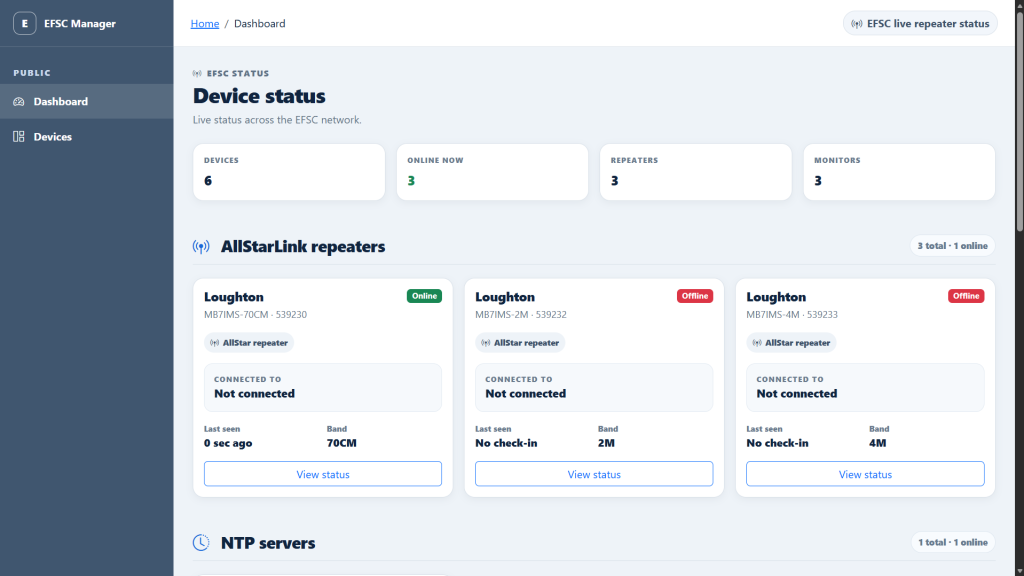
New Dashboard Coming

Lately behind the scenes a new dashboard has been born. Working with across a range of different nodes and devices a unified approach was needed. The unnamed project brings the status of all of the nodes in to one place. Also allowing a lot of management of nodes to happen. One of the biggest changes is each node will have its own control dashboard. This will allow some tests to be carried out and massively to be able to change what network the node is connected to.

A few back end bits like alerting to the keeper will improve down time. Also with each node having a web front end they will be using 44.31.X.X addresses. The admin side of the portal handles a lot more than just the simplex nodes. It can interact with the core router to control addresses given to the nodes. In time more images will come out of for this.

Power + Control

While the nodes been out of action I have been looking a the power options. This was installed 4 years ago when I made the first power splitter for power. This time we are looking at how we display power when there is issues. Also each node now has its own Wifi smart switch to isolate each radio node at the power supply level. Part of this move is so it easier to turn one off than all.

Each all star link node is getting it’s own dashboard allowing amateurs to move the connected node to their network of choice (Some excluded however). This also gives data about the node and allows us to remotely manage nodes. A lot more health monitoring and we are implementing 44net addresses on each node. With this it is a build in house and very bespoke to EFSC. A new core router is planned for later on to improve operations.

All this is a long time coming as it just more awaiting parts to come in.

Latest update

Two new Cat5 runs are in place to where the simplex nodes meet the house internet. However these are in place a new fault was located in the power control so this is being worked on. New plan for end of June for nodes to return back to service with dashboards and better functionality.

Update on outages

Currently awaiting new fibre and good weather to be replaced. Very likely be swapped to Cat5 as a bit more suited. This will be when the keeper is back from holiday. We did try and improve the connection over the mesh but no joy.

Outages 27/04/2026

We have noticed all of the nodes are currently dropping offline regularly. This from a very quick test appeared to be passing over the mesh wifi at the location. No fibre activity on the port so will be a bit of time to fix. This is due to Both M9TTL and M7ORN are due to get married so focus is else where.

MB7AMS So long and farewell

With the changes of the Amateur Radio License, I have decided to handback MB7AMS before their NoV’s expire. The two nodes which made up MB7AMS are going to join the MB7IMS cluster which includes a 2M and a 6M node set. There will be some downtime as bits are updated like call signs. Frequency’s should stay the same.

Why No Antenna Photos

It can be a balance of showing off a setup and privacy.

A few times I have taken photos of my antenna setup and online those living near me had concern about bits of their house / garden being shown. A local kindly have used the photos as “proof” to the local council I am breaking planning laws. In true style only their views on the planning laws.

The closest house to where I live views was I do not mind the antennas but please do not include my house. Quiet hard to do. For me there are some photos of the Antenna that provides MB7RMS simply as this can be done without any house’s in view.

I do aim to keep all the antennas in the best shape going to save the issues. My local council however have been out and checked and happy with the 1 mast rule.

Why split network

With Amateur / Ham Radio there is always a new and upcoming communication method. Even infighting with in operators which calls splinter networks to form. As a keeper I am spoiled for choice with a few of the networks. All connected well in the sense of ways to access them but not interconnected with each other. The choice of having all 4 nodes on the same network vs splitting the network became hard. In the end I picked to have MB7IMS on the Freedom Network and MB7AMS on Freestar. This means two pairs of nodes on each. It helped to ensure a great coverage from both networks.

For me it is about choice. I am not loyal to one or the other. Both have great talks on them by fellow hams. Both connect the world. Sometimes I do feel like I should pick one and that is it. However speaking with others locally the choice is good. I know that MB7AMS is only on at night time but this is when I noticed traffic is connected better. There is more activity.

If a new network appeared I would need to make a choice and review. However If a network became less busy / Ethics came in to question I would look to review.

I am however always open for new ideas and networks. Drop a email to keeper@efsc.co.uk